Navico
B&G GoFree Controller & Viewer
B&G GoFree Controller & Viewer ist eine App von Navico. Veröffentlicht 13 years ago. 3.0.4 Version.
Teilen
Diese App weiterempfehlen
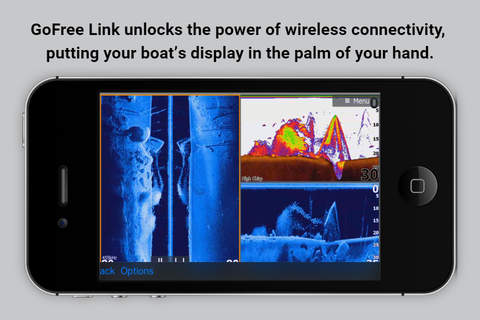
Install the B&G GoFree Link app on your iPad or iPhone and get the benefit of an additional display, but with the added convenience of portability. From any location on your vessel you can fully control multiple Lowrance, Simrad or B&G multifunction displays with an iPad, or view onscreen elements from multiple displays by using your iPhone as a pocket-sized repeater screen.
If your display unit has built-in wireless capability or is networked to a WIFI-1 module, you should definitely download this app.
To use the B&G GoFree Link app, you must have access to a wireless connection from a GoFree WIFI-1 access point installed on the network or a display unit with built-in wireless capability. Lowrance HDS Gen3, Simrad Go7 and B&G Vulcan7 models have integrated wireless connectivity, so a WIFI-1 access point is not required for those units.
The following Multifunction Displays are compatible with B&G GoFree Link:
LOWRANCE
- HDS Gen3
- HDS Gen2 Touch
- HDS Gen2 (view only)
SIMRAD
- NSO evo2
- NSS7 evo2, NSS9 evo2, NSS12 evo2, NSS16 evo2
- GO7
- NSS7, NSS8, NSS12
B&G
- Zeus2
- Vulcan7
- Zeus Touch
Instructions for use:
1. Download the B&G GoFree Link app to your iPad/iPhone.
2. Once onboard the vessel, connect to the GoFree Wireless Network.
3. Run the B&G GoFree Link app and select the Multifunction display you would like to view and/or control.
If your display unit has built-in wireless capability or is networked to a WIFI-1 module, you should definitely download this app.
To use the B&G GoFree Link app, you must have access to a wireless connection from a GoFree WIFI-1 access point installed on the network or a display unit with built-in wireless capability. Lowrance HDS Gen3, Simrad Go7 and B&G Vulcan7 models have integrated wireless connectivity, so a WIFI-1 access point is not required for those units.
The following Multifunction Displays are compatible with B&G GoFree Link:
LOWRANCE
- HDS Gen3
- HDS Gen2 Touch
- HDS Gen2 (view only)
SIMRAD
- NSO evo2
- NSS7 evo2, NSS9 evo2, NSS12 evo2, NSS16 evo2
- GO7
- NSS7, NSS8, NSS12
B&G
- Zeus2
- Vulcan7
- Zeus Touch
Instructions for use:
1. Download the B&G GoFree Link app to your iPad/iPhone.
2. Once onboard the vessel, connect to the GoFree Wireless Network.
3. Run the B&G GoFree Link app and select the Multifunction display you would like to view and/or control.
Smart erkannt
App-Funktionen
Automatisch aus Beschreibung, Titel und Kategorie erkannt.
🗺️
Interaktive Karten
🖥️
Mac / iPad App
👍
Likes & Reaktionen
🎮
Controller-Unterstützung
🔵
Bluetooth-Verbindung
₿
Krypto & Blockchain